Showing posts with label Heap. Show all posts

Dictionary

Dictionary Data Structure

  • Dictionary is one of the most used Data Structures for storing data in the key-value format. 
  • Each element in a dictionary data structure is required to have a key, and that key must be paired with a value. 
  • To put it another way, the Dictionary data structure is used to store information in key-value pairs. 
  • The Dictionary data structure is sometimes known as an associative array, a map, or a symbol table, but it is most commonly referred to as Dictionary.
  • Many prominent languages contain Dictionary or associative array as a primitive data type, whereas languages that do not include Dictionary or associative array as a primitive data type include Dictionary or associative array in their software libraries. 
  • Content-addressable memory is a direct kind of hardware-level support for the Dictionary or associative array.
Dictionary

On a Dictionary or associative array, the following operations are performed:

Add or Insert:  
  • A new pair of keys and values is added to the Dictionary or associative array object when you use the Add or Insert operation.
Replace or reassign: 
  • The Replace or reassign procedure modifies or replaces an existing value that is connected with a key. 
  • To put it another way, a new value is mapped to an existing key.
Delete or remove: 
  • When you delete or remove an element from a Dictionary or associative array object, the existing element is unmapped.
Find or Lookup: 
  • The value associated with a key is searched by giving the key as a search argument in the Find or Lookup operation.

Now let us write a C++ code that will give us an idea about how to use Dictionary or associative array and their basic functionalities in C++.

Code:

  1. // c++ code to implement all the basic fucntionalites[add, remove. print, search] of the Dictionary Data Structure  
  2. // iostream library is included for basic input output operations    
  3. #include <iostream>   
  4. // map library is included to use map in our c++ code   
  5. #include <map>  
  6. // string header is also included in the code to make use of the string objects in the c++ code  
  7. #include <string>   
  8. using namespace std;    
  9. // a map object is created that will stores strings indexed by strings ( that means both the key and the value will be of the string type.)  
  10. // NOTE: In C++ we need to explicitly specify the data type of the key and values to be stored in the map or dictionary object  
  11. std::map<std::string, std::string> capitals;    
  12. // a fucntion named insert_elements is created to add elements into the map or dictionary object named capitals  
  13. void insert_elements(){    
  14.     std::string key;  
  15.     std::string value;   
  16.     std::cout<<"\nEnter the name of the country : ";  
  17.     std::cin>>key;  
  18.     std::cout<<"Enter the capital of "<<key<<" : ";  
  19.     std::cin>>value;       
  20.     // value is mapped to the key and inserted successfully to the map or dictionary object named capitals  
  21.     capitals[key]=value;    
  22. }    
  23. // a fucntion named print_elements is created to all the elements present in the capitals dictionary object    
  24. void print_elements(){   
  25.     // each element of the capitals object of the dictionary is iterated and printed  
  26.     for ( auto item : capitals ) {            
  27.         std::cout <<"Name of the country "<< item.first << ": Name of the capital ";  
  28.         std::cout << item.second << std::endl;  
  29.     }    
  30. }    
  31. // a fucntion named delete_elements is created to delete element or elements from the dictionary object named capitals  
  32. void delete_elements(){    
  33.     std :: string key_to_be_deleted;    
  34.     std :: cout << "\nEnter the name of the country that you want to delete : ";  
  35.     std :: cin >> key_to_be_deleted;    
  36.     capitals.erase(key_to_be_deleted);    
  37. }    
  38. // a function named search_elements is created to perform search or find operation on the capitals dictionary object  
  39. void search_elements(){    
  40.     std :: string key_to_be_searched;    
  41.     std :: cout << "\nEnter the name of the country that you want to search : ";  
  42.     std :: cin >> key_to_be_searched;    
  43.     std :: cout << "Capital of "<< key_to_be_searched << " is " << capitals[key_to_be_searched]<< "\n"  
  44. }    
  45. // a fucntion named update_elements is created to update_elements is created to update or modify the already present elements in the dictionary object  
  46. void update_elements(){    
  47.     std :: string key_to_be_updated;  
  48.     std :: string new_key;        
  49.     std :: cout << "\nEnter the name of the country whose capital you want to update : ";  
  50.     std :: cin >> key_to_be_updated;  
  51.     std :: cout << "Enter the name of new capital : ";  
  52.     std :: cin >> new_key;    
  53.     capitals[key_to_be_updated]=new_key;    
  54. }    
  55. // main function is written to handle the execution of the code.  
  56. int main()  
  57. {        
  58. int choice;    
  59. // a menu driven program is written to call the various functions that does various operations on the dictionary object named capitals    
  60.     while(1){    
  61.         std::cout<<"\n1. To insert data into the Dictionary."<<std::endl;  
  62.         std::cout<<"2. To print data from the Dictionary."<<std::endl;  
  63.         std::cout<<"3. To delete data from the Dictionary."<<std::endl;  
  64.         std::cout<<"4. To search data from the Dictionary."<<std::endl;  
  65.         std::cout<<"5. To update data from the Dictionary."<<std::endl;  
  66.         std::cout<<"0. To exit the code."<<std::endl;  
  67.         std::cout<<"Enter your choice:";    
  68.         std::cin>>choice;    
  69.         switch(choice){  
  70.               case 0 :   
  71.                   // to exit the code.  
  72.                 exit(0);  
  73.               case 1 :  
  74.                   // to insert elements in the dictionary object  
  75.                 insert_elements();  
  76.                 break;  
  77.               case 2 :  
  78.                   // to print elements in the dictionary object  
  79.                 std::cout<<std::endl;  
  80.                 std::cout<<"Contents of the Dictionary are : \n";  
  81.                 print_elements();  
  82.                 break;  
  83.               case 3 :  
  84.                   // to delete elements in the dictionary object  
  85.                 std::cout<<std::endl;  
  86.                 delete_elements();  
  87.                 std::cout<<"Element deleted sucessfully.\n";  
  88.                 break;  
  89.               case 4 :  
  90.                   // to search elements in the dictionary object  
  91.                 std::cout<<std::endl;  
  92.                 std::cout<<"Result of the search in the dictionary is  : ";  
  93.                 search_elements();  
  94.                 break;  
  95.               case 5 :  
  96.                   // to update elements in the dictionary object  
  97.                 std::cout<<std::endl;  
  98.                 update_elements();  
  99.                 std::cout<<"Contents of the Dictionary updated sucessfully.\n";  
  100.                 break;  
  101.               default :  
  102.                   std::cout<<"Please Enter valid input.";  
  103.           }  
  104.       }  
  105.       return 0;  
  106. }  
  107. //end of the main function  

Output:

1. To insert data into the Dictionary.
2. To print data from the Dictionary.
3. To delete data from the Dictionary.
4. To search data from the Dictionary.
5. To update data from the Dictionary.
0. To exit the code.
Enter your choice:1

Enter the name of the country : India
Enter the capital of India : Delhi

1. To insert data into the Dictionary.
2. To print data from the Dictionary.
3. To delete data from the Dictionary.
4. To search data from the Dictionary.
5. To update data from the Dictionary.
0. To exit the code.
Enter your choice:1

Enter the name of the country : Dominica
Enter the capital of Dominica : Roseau

1. To insert data into the Dictionary.
2. To print data from the Dictionary.
3. To delete data from the Dictionary.
4. To search data from the Dictionary.
5. To update data from the Dictionary.
0. To exit the code.
Enter your choice:1

Enter the name of the country : Haiti
Enter the capital of Haiti : Port-au-prince

1. To insert data into the Dictionary.
2. To print data from the Dictionary.
3. To delete data from the Dictionary.
4. To search data from the Dictionary.
5. To update data from the Dictionary.
0. To exit the code.
Enter your choice:1

Enter the name of the country : USA
Enter the capital of USA : Washington

1. To insert data into the Dictionary.
2. To print data from the Dictionary.
3. To delete data from the Dictionary.
4. To search data from the Dictionary.
5. To update data from the Dictionary.
0. To exit the code.
Enter your choice:2

Contents of the Dictionary are : 
Name of the country Dominica: Name of the capital Roseau
Name of the country Haiti: Name of the capital Port-au-prince
Name of the country India: Name of the capital Delhi
Name of the country USA: Name of the capital Washington

1. To insert data into the Dictionary.
2. To print data from the Dictionary.
3. To delete data from the Dictionary.
4. To search data from the Dictionary.
5. To update data from the Dictionary.
0. To exit the code.
Enter your choice:3


Enter the name of the country that you want to delete : Haiti
Element deleted successfully.

1. To insert data into the Dictionary.
2. To print data from the Dictionary.
3. To delete data from the Dictionary.
4. To search data from the Dictionary.
5. To update data from the Dictionary.
0. To exit the code.
Enter your choice:2

Contents of the Dictionary are : 
Name of the country Dominica: Name of the capital Roseau
Name of the country India: Name of the capital Delhi
Name of the country USA: Name of the capital Washington

1. To insert data into the Dictionary.
2. To print data from the Dictionary.
3. To delete data from the Dictionary.
4. To search data from the Dictionary.
5. To update data from the Dictionary.
0. To exit the code.
Enter your choice:4

Result of the search in the dictionary is  : 
Enter the name of the country that you want to search : USA
Capital of USA is Washington

1. To insert data into the Dictionary.
2. To print data from the Dictionary.
3. To delete data from the Dictionary.
4. To search data from the Dictionary.
5. To update data from the Dictionary.
0. To exit the code.
Enter your choice:5


Enter the name of the country whose capital you want to update : India
Enter the name of new capital : New-Delhi       
Contents of the Dictionary updated successfully.

1. To insert data into the Dictionary.
2. To print data from the Dictionary.
3. To delete data from the Dictionary.
4. To search data from the Dictionary.
5. To update data from the Dictionary.
0. To exit the code.
Enter your choice:2

Contents of the Dictionary are : 
Name of the country Dominica: Name of the capital Roseau
Name of the country India: Name of the capital New-Delhi
Name of the country USA: Name of the capital Washington

1. To insert data into the Dictionary.
2. To print data from the Dictionary.
3. To delete data from the Dictionary.
4. To search data from the Dictionary.
5. To update data from the Dictionary.
0. To exit the code.
Enter your choice:0

Heap

Heap Data Structure
  • Heap is a binary tree that stores a collection of keys by satisfying heap property. Max heap and min heap are two flavors of heap data structure. 
  • The heap property for max heap is: each node should be greater than or equal to each of its children. 
  • While, for min heap it is: each node should be smaller than or equal to each of its children. 
  • Heap data structure is usually used to implement priority queues.
  • Heap is a special case of balanced binary tree data structure where the root-node key is compared with its children and arranged accordingly. If α has child node β then −
key(α) ≥ key(β)
  • As the value of parent is greater than that of child, this property generates Max Heap. Based on this criteria, a heap can be of two types −
For Input → 35 33 42 10 14 19 27 44 26 31
  • Min-Heap − Where the value of the root node is less than or equal to either of its children.
Max-Heap − Where the value of the root node is greater than or equal to either of its children.
  • Both trees are constructed using the same input and order of arrival.
Max Heap Construction Algorithm
  • We shall use the same example to demonstrate how a Max Heap is created. The procedure to create Min Heap is similar but we go for min values instead of max values.
  • We are going to derive an algorithm for max heap by inserting one element at a time. At any point of time, heap must maintain its property. 
  • While insertion, we also assume that we are inserting a node in an already heapified tree.
Step 1 − Create a new node at the end of heap.
Step 2 − Assign new value to the node.
Step 3 − Compare the value of this child node with its parent.
Step 4 − If value of parent is less than child, then swap them.
Step 5 − Repeat step 3 & 4 until Heap property holds.
Note − In Min Heap construction algorithm, we expect the value of the parent node to be less than that of the child node.
Let's understand Max Heap construction by an animated illustration. We consider the same input sample that we used earlier.
Max Heap Deletion Algorithm
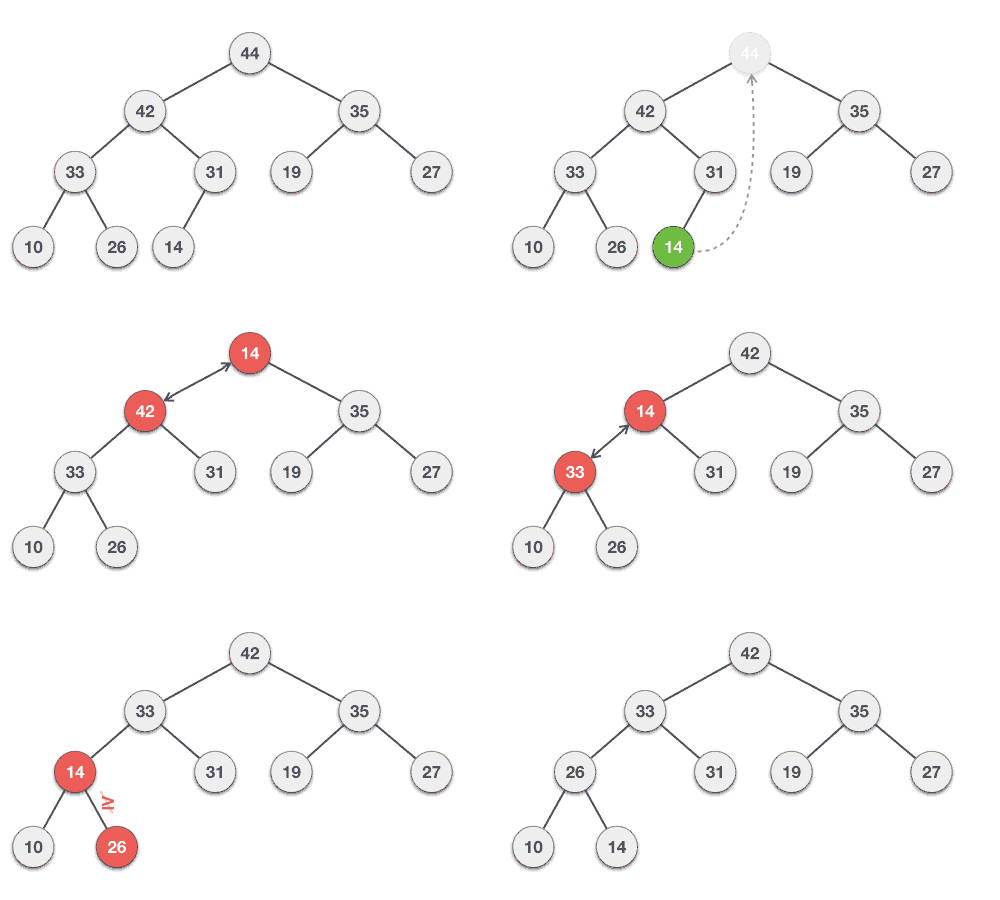
  • Let us derive an algorithm to delete from max heap. Deletion in Max (or Min) Heap always happens at the root to remove the Maximum (or minimum) value.
Step 1 − Remove root node.
Step 2 − Move the last element of last level to root.
Step 3 − Compare the value of this child node with its parent.
Step 4 − If value of parent is less than child, then swap them.
Step 5 − Repeat step 3 & 4 until Heap property holds.