Showing posts with label algorithm for insertion in singly link list. Show all posts

Insertion in singly linked list 1

Insertion in singly linked list (at the end).

There are two cases that need to be described in order to put a node at the end.
  1. The node is being added to a list that is currently empty.
  2. The node is appended to the connected list's end.
The first case:
  • The condition (head == NULL) is satisfied in the first case. As a result, we only need to use the malloc statement in C to allocate space for the node. The following statements are used to build up the data and link parts of the node.
ptr->data = item;  
                ptr -> next = NULL; 
  • Because ptr is the only node that will be added into the list, it must be pointed to by the list's head pointer. The following statements will be used to do this.
Head = ptr     

The second case:

  • Because Head is not null, the condition Head = NULL would fail. In order to traverse the list, we must first declare a temporary pointer temp. temp is set to point to the list's initial node.
Temp = head  
  • Then, traverse through the entire linked list using the statements: 
while (temp→ next != NULL)  
            temp = temp → next; 
  • The temp will point to the last node of the list at the end of the loop. Now, set aside space for the new node and assign the item to its data section. 
  • Because the new node will be the last node in the list, the next component of this node must point to null. The next section of the temp node (which is presently the list's last node) must point to the new node (ptr).
temp = head;  
        while (temp -> next != NULL)  
        {  
            temp = temp -> next;  
        }  
        temp->next = ptr;  
        ptr->next = NULL;

Insertion in singly linked list


Algorithm

  • Step 1: IF PTR = NULL Write OVERFLOW
         Go to Step 1
         [END OF IF]
  • Step 2: SET NEW_NODE = PTR
  • Step 3: SET PTR = PTR - > NEXT
  • Step 4: SET NEW_NODE - > DATA = VAL
  • Step 5: SET NEW_NODE - > NEXT = NULL
  • Step 6: SET PTR = HEAD
  • Step 7: Repeat Step 8 while PTR - > NEXT != NULL
  • Step 8: SET PTR = PTR - > NEXT
         [END OF LOOP]
  • Step 9: SET PTR - > NEXT = NEW_NODE
  • Step 10: EXIT
C program to insert data(at the end) in singly linked list.

#include<stdio.h>  
#include<stdlib.h>  
void lastinsert(int);  
struct node  
{  
    int data;  
    struct node *next;  
};  
struct node *head;  
void main ()  
{  
    int choice,item;  
    do   
    {  
        printf("\nEnter the item which you want to insert?\n");  
        scanf("%d",&item);  
        lastinsert(item);  
        printf("\nPress 0 to insert more ?\n");  
        scanf("%d",&choice);  
    }while(choice == 0);  
}  
void lastinsert(int item)  
    {  
        struct node *ptr = (struct node*)malloc(sizeof(struct node));     
        struct node *temp;  
        if(ptr == NULL)  
        {  
            printf("\nOVERFLOW");     
        }  
        else  
        {  
            ptr->data = item;  
            if(head == NULL)  
            {  
                ptr -> next = NULL;  
                head = ptr;  
                printf("\nNode inserted");  
            }  
            else  
            {  
                temp = head;  
                while (temp -> next != NULL)  
                {  
                    temp = temp -> next;  
                }  
                temp->next = ptr;  
                ptr->next = NULL;  
                printf("\nNode inserted");  
              
            }  
        }  
    }  

Expected Output:

Enter the item which you want to insert?
12
Node inserted
Press 0 to insert more ?
0
Enter the item which you want to insert?
23
Node inserted
Press 0 to insert more ?
2

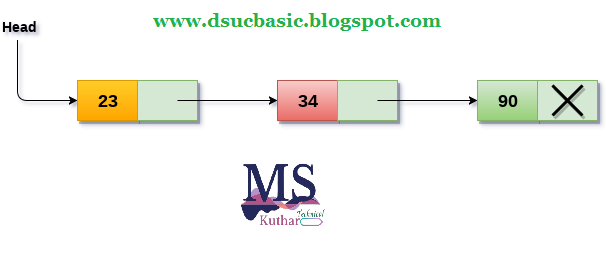
Singly Linked List

One-way chain or single-linked list

  • A singly linked list is a collection of elements that are arranged in a specific order. 
  • The number of elements may vary depending on the program's requirements. In a single linked list, a node is made up of two parts: data and link. 
  • The data component of the node stores the actual data that the node will represent, while the link part stores the address of the node's immediate successor.
  • A one-way chain, also known as a singly linked list, can only be traversed in one direction. 
  • To put it another way, we may say that each node has only the next pointer, therefore we can't traverse the list backwards.

Consider the following scenario: the student's grades in three marks are maintained in a linked list, as indicated in the image.

Singly Linked List
Singly Linked List

  • The links are represented by the arrow in the diagram above. 
  • The marks earned by the student in each topic are stored in the data section of each node. 
  • The null pointer in the address part of the last node identifies it as the last node in the list. In the data section of the list, we can have as many elements as we like.

Operations on Singly Linked List

On a singly linked list, you can conduct a variety of actions. The following is a list of all such operations.
  1. Insertion in singly linked list at beginning.
  2. Insertion in singly linked list at end.
  3. Insertion in singly linked list after specific node.
    • Deletion and Traversing.
    1. Deletion at beginning.
    2. Deletion at the end of the list.
    3. Deletion after specified node.
    4. Traversing.
    5. Searching.

    Node Creation

    struct node   
    {  
        int data;   
        struct node *next;  
    };  
    struct node *head, *ptr;   
    ptr = (struct node *)malloc(sizeof(struct node *));  

    Insertion

    • Insertion into a singly linked list can take place at several points. The insertion is classified into the following types based on the position of the new node being inserted.

    Insertion in singly linked list at beginning

    • It's easy to add a new element to a single linked list at the start. Only a few changes to the node linkages are required. The steps below must be followed in order to add a new node to the list at the start.
    • Allocate space for the new node and place data in the node's data section. The following statements will accomplish this.
    ptr = (struct node *) malloc(sizeof(struct node *));  
                ptr → data = item   
    • Make the new node's link component point to the list's existing first node. The following expression will be used to do this.
    ptr->next = head;  
    • Finally, we must make the new node the first node in the list, which may be accomplished with the following statement.
    head= ptr ;

    Algorithm

    • Step 1: IF PTR = NULL
               Write OVERFLOW
               Go to Step 7
               [END OF IF]
    • Step 2: SET NEW_NODE = PTR
    • Step 3: SET PTR = PTR → NEXT
    • Step 4: SET NEW_NODE → DATA = VAL
    • Step 5: SET NEW_NODE → NEXT = HEAD
    • Step 6: SET HEAD = NEW_NODE
    • Step 7: EXIT
    Singly Linked List

    C program to insert new data (at the beginning) in singly linked list.
    #include<stdio.h>  
    #include<stdlib.h>  
    void beginsert(int);  
    struct node  
    {  
        int data;  
        struct node *next;  
    };  
    struct node *head;  
    void main ()  
    {  
        int choice,item;  
        do   
        {  
            printf("\nEnter the item which you want to insert?\n");  
            scanf("%d",&item);  
            beginsert(item);  
            printf("\nPress 0 to insert more ?\n");  
            scanf("%d",&choice);  
        }while(choice == 0);  
    }  
    void beginsert(int item)  
        {  
            struct node *ptr = (struct node *)malloc(sizeof(struct node *));  
            if(ptr == NULL)  
            {  
                printf("\nOVERFLOW\n");  
            }  
            else  
            {  
                ptr->data = item;  
                ptr->next = head;  
                head = ptr;  
                printf("\nNode inserted\n");  
            }    
        }  

    Expected Output:
    Enter the item which you want to insert?
    12
    Node inserted
    Press 0 to insert more ?
    0
    Enter the item which you want to insert?
    23
    Node inserted
    Press 0 to insert more ?
    2