Showing posts with label er. manjeet singh kuthar. Show all posts

Deletion Operation in Max Heap


Deletion Operation in Max Heap
In a max heap, deleting last node is very simple as it is not disturbing max heap properties.

Deleting root node from a max heap is title difficult as it disturbing the max heap properties. We use the following steps to delete root node from a max heap...
  • Step 1: Swap the root node with last node in max heap
  • Step 2: Delete last node.
  • Step 3: Now, compare root value with its left child value.
  • Step 4: If root value is smaller than its left child, then compare left child with its right sibling. Else goto Step 6
  • Step 5: If left child value is larger than its right sibling, then swap root with left child. otherwise swap root with its right child.
  • Step 6: If root value is larger than its left child, then compare root value with its right child value.
  • Step 7: If root value is smaller than its right child, then swap root with rith child. otherwise stop the process.
  • Step 8: Repeat the same until root node is fixed at its exact position.
Example
Consider the above max heap. Delete root node (90) from the max heap.
  • Step 1: Swap the root node (90) with last node 75 in max heap After swapping max heap is as follows...
  • Step 2: Delete last node. Here node with value 90. After deleting node with value 90 from heap, max heap is as follows...
  • Step 3: Compare root node (75) with its left child (89).
  • Here, root value (75) is smaller than its left child value (89). So, compare left child (89) with its right sibling (70).
  • Step 4: Here, left child value (89) is larger than its right sibling (70), So, swap root (75) with left child (89).
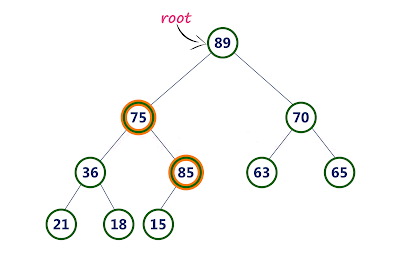
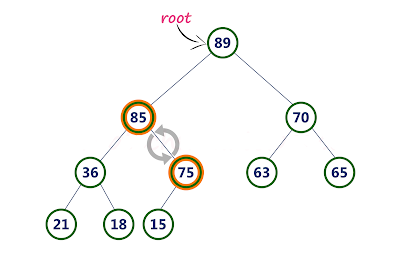
  • Step 5: Now, again compare 75 with its left child (36).
  • Here, node with value 75 is larger than its left child. So, we compare node with value 75 is compared with its right child 85.

  • Step 6: Here, node with value 75 is smaller than its right child (85). So, we swap both of them. After swapping max heap is as follows...
  • Step 7: Now, compare node with value 75 with its left child (15).
  • Here, node with value 75 is larger than its left child (15) and it does not have right child. So we stop the process.

    Finally, max heap after deleting root node (90) is as follows...

Arrays

  • Arrays are collections of data elements of the same type that are stored in contiguous memory regions.
  • Arrays are a derived data type in the C programming language that may hold primitive data types like int, char, double, float, and so on.
  • The simplest data structure is an array, which allows each data element to be accessed at random using its index number.
  • For example, if we want to record a student's grades in six subjects, we don't need to create separate variables for each subject's grades. 
  • Instead, we can create an array that can be used to hold the marks in each subject in contiguous memory locations.
Arrays in Data Structure

The array markings[20] contains the student's marks in twenty separate subjects, each of which is represented by a different subscript in the array, such as marks[0] for the first subject, marks[1] for the second subject, and so on.

The array's properties.

  • Each element has the same data type and size, namely int = 2 bytes.
  • The array's elements are kept in contiguous memory regions, with the first element kept in the smallest memory place.
  • Because we can calculate the address of each element of the array with the supplied base address and data element size, we can access elements of the array at random.
For example, in the C programming language, declaring an array looks like this:

int arr[20]; 
char arr[20]; 
float arr[5] 

Why do we need to use an array?

  • In most circumstances, computer programming necessitates the storage of a huge number of data of comparable type. 
  • We need to define a big number of variables to store such a large amount of data. While writing the programmes, it would be extremely tough to remember the names of all the variables. 
  • It is preferable to build an array and store all the elements in it rather than naming all the variables with various names.
The following example shows how arrays can be useful when developing code to solve a specific problem.
  • In the example below, we have an exam scores in six different subjects. The goal of the challenge is to determine the average of all of the student's grades.
  • To demonstrate the importance of arrays, we constructed two programmes, one without utilizing arrays and the other using arrays used to store marks.
Program without array:

#include <stdio.h>  
void main ()  
{  
    int marks_1 = 56, marks_2 = 78, marks_3 = 88, marks_4 = 76, marks_5 = 56, marks_6 = 89;   
    float avg = (marks_1 + marks_2 + marks_3 + marks_4 + marks_5 +marks_6) / 6 ;   
    printf(avg);   
}  
Program by using array:

#include <stdio.h>  
void main ()  
{  
    int marks[6] = {56,78,88,76,56,89);  
    int i;    
    float avg;  
    for (i=0; i<6; i++ )   
    {  
        avg = avg + marks[i];   
    }    
    printf(avg);   
}   

The Benefits of Array

  • Because an array gives a single name for a set of variables of the same type, it is simple to remember the names of all the array's elements.
  • Traversing an array is a simple task; all we have to do is increase the array's base address to visit each element one by one.
  • The index can be used to directly access any element in the array.

B-Tree

B-Tree in Data Structure.

Every node in a binary search tree, such as an AVL Tree or a Red-Black Tree, can only have one value (key) and a maximum of two children, but there is another type of search tree known as a B-Tree that allows a node to store more than one value (key) and have more than two children.
  • The Height Balanced m-way Search Tree, also known as B-Tree, was created by Bayer and McCreight in 1972. It was then given the name B-Tree.
  • B-Tree can be defined as follows...
"B-Tree is a self-balanced search tree with multiple keys in every node and more than two children for every node."
  • A B-tree is a method of placing and locating files (called records or keys) in a database. (The meaning of the letter B has not been explicitly defined.) The B-tree algorithm minimizes the number of times a medium must be accessed to locate a desired record, thereby speeding up the process.
  • Here, number of keys in a node and number of children for a node is depend on the order of the B-Tree. 
  • Every B-Tree has order.
B-Tree of Order m has the following properties...
  1. All the leaf nodes must be at same level.
  2. All nodes except root must have at least [m/2]-1 keys and maximum of m-1 keys.
  3. All non leaf nodes except root (i.e. all internal nodes) must have at least m/2 children.
  4. If the root node is a non leaf node, then it must have at least 2 children.
  5. A non leaf node with n-1 keys must have n number of children.
  6. All the key values within a node must be in Ascending Order.
For example, B-Tree of Order 4 contains maximum 3 key values in a node and maximum 4 children for a node.

Example..

The following operations are performed on a B-Tree...
  1. Search
  2. Insertion
  3. Deletion
Search Operation in B-Tree

B-Tree
  • The search operation in a B-Tree is similar to that of a Binary Search Tree.
  • The search procedure in a Binary search tree begins at the root node, and we make a 2-way decision every time we make a decision (we go to either left subtree or right sub-tree).
  • In a B-Tree, the search process also begins at the root node, but we make an n-way decision each time, where n is the total number of children a node has.
  • The search operation in a B-Tree has a temporal complexity of O(log n). The following is how the search is carried out...

Searching in B Trees is similar to that in Binary search tree. For example, if we search for an item 49 in the following B Tree. The process will something like following :

  1. Compare item 49 with root node 78. since 49 < 78 hence, move to its left sub-tree.
  2. Since, 40<49<56, traverse right sub-tree of 40.
  3. 49>45, move to right. Compare 49.
  4. match found, return.
  • Searching in a B tree depends upon the height of the tree. The search algorithm takes O(log n) time to search any element in a B tree.
The insertion operation is performed as follows...

Step 1: 
  • Check whether tree is Empty.
Step 2: 
  • If tree is Empty, then create a new node with new key value and insert into the tree as a root node.
Step 3: 
  • If tree is Not Empty, then find a leaf node to which the new key value cab be added using Binary Search Tree logic.
Step 4: 
  • If that leaf node has an empty position, then add the new key value to that leaf node by maintaining ascending order of key value within the node.
Step 5: 
  • If that leaf node is already full, then split that leaf node by sending middle value to its parent node. Repeat tha same until sending value is fixed into a node.
Step 6: 
  • If the splitting is occurring to the root node, then the middle value becomes new root node for the tree and the height of the tree is increased by one.
Example..

Construct a B-Tree of Order 3 by inserting numbers from 1 to 10.

Deletion in B-Tree

At the leaf nodes, deletion is also conducted. It can be a leaf node or an inside node that needs to be deleted. In order to delete a node from a B tree, use the following algorithm.
  • Determine the location of the leaf node.
  • If the leaf node has more than m/2 keys, delete the required key from the node.
  • If the leaf node lacks m/2 keys, fill in the gaps with the element from the eighth or left sibling.
  1. If the left sibling has more than m/2 elements, shift the intervening element down to the node where the key is deleted and push the largest element up to its parent.
  2. If the right sibling has more than m/2 items, shift the intermediate element down to the node where the key is deleted and push the smallest element up to the parent.
  • Create a new leaf node by merging two leaf nodes and the parent node's intervening element if neither sibling has more than m/2 elements.
  • If the parent has less than m/2 nodes, repeat the operation on the parent as well.
If the node to be removed is an internal node, its in-order successor or predecessor should be used instead. The process will be same as the node is deleted from the leaf node because the successor or predecessor will always be on the leaf node.

Let us see the Example:
  • Remove node 53 from the B Tree of order 5, as indicated in the diagram.
  • 53 is present in the right child of element 49. Delete it.

  • Now there is only 57 items remaining in the node, and the minimal number of elements required in a B tree of order 5 is 2. 
  • It's less than that, and the elements in its left and right subtrees aren't enough, so combine it with the left sibling and parent's intervening element, i.e. 49.

The B tree is used in following manners.
  • Because accessing values held in a huge database that is saved on a disc is a very time consuming activity, B tree is used to index the data and enable fast access to the actual data stored on the discs.
  • In the worst situation, searching an un-indexed and unsorted database with n key values takes O(n) time. In the worst-case scenario, if we use B Tree to index this database, it will be searched in O(log n) time.


Array in Data Structure

The array is a container for a certain number of elements, all of which must be of the same type. Arrays are used by the majority of data structures to implement their algorithms. The following are some key terms to know in order to grasp the notion of Array.
Element − Each item stored in an array is called an element.
Index − Each location of an element in an array has a numerical index, which is used to identify the element.

Array Representation

Arrays can be declared in various ways in different languages. For illustration, let's take C array declaration.

As per the above illustration, the following are the important points to be considered.
  • Index starts with 0.
  • Array length is 8 which means it can store 8 elements.
  • Each element can be accessed via its index. For example, we can fetch an element at index 6 as 9.

Basic Operations

Following are the basic operations supported by an array.
Traverse − print all the array elements one by one.
Insertion − Adds an element at the given index.
Deletion − Deletes an element at the given index.
Search − Searches an element using the given index or by the value.
Update − Updates an element at the given index.
In C, when an array is initialized with size, then it assigns defaults values to its elements in the following order.
Data TypeDefault Value
boolfalse
char0
int0
float0.0
double0.0f
void
wchar_t0

Insertion Operation

  • One or more data elements are inserted into an array using the insert operation. A new element can be added to the beginning, end, or any provided index of the array, depending on the necessity.
  • We can see an actual implementation of the insertion action here, where we add data to the array's end.

Algorithm

Let Array be a linear unordered array of MAX elements.

Example

Result
Let LA be a Linear Array (unordered) with N elements and K is a positive integer such that K<=N. Following is the algorithm where ITEM is inserted into the Kth position of LA −
1. Start
2. Set J = N
3. Set N = N+1
4. Repeat steps 5 and 6 while J >= K
5. Set LA[J+1] = LA[J]
6. Set J = J-1
7. Set LA[K] = ITEM
8. Stop

Example
Following is the implementation of the above algorithm −
#include <stdio.h>

main() {
   int LA[] = {1,3,5,7,8};
   int item = 10, k = 3, n = 5;
   int i = 0, j = n;
  
   printf("The original array elements are :\n");
        
   for(i = 0; i<n; i++) {
      printf("LA[%d] = %d \n", i, LA[i]);
   }
   
   n = n + 1;
        
   while( j >= k) {
      LA[j+1] = LA[j];
      j = j - 1;
   }
        
   LA[k] = item;
  
         printf("The array elements after insertion :\n");
        
   for(i = 0; i<n; i++) {
      printf("LA[%d] = %d \n", i, LA[i]);
   }
}
When we compile and execute the above program, it produces the following result −
Output
The original array elements are :
LA[0] = 1
LA[1] = 3
LA[2] = 5
LA[3] = 7
LA[4] = 8
The array elements after insertion :
LA[0] = 1
LA[1] = 3
LA[2] = 5
LA[3] = 10
LA[4] = 7
LA[5] = 8

Deletion Operation
  • Deletion refers to removing an existing element from the array and re-organizing all elements of an array.
Algorithm
  • Consider LA is a linear array with N elements and K is a positive integer such that K<=N. Following is the algorithm to delete an element available at the Kth position of LA.
1. Start
2. Set J = K
3. Repeat steps 4 and 5 while J < N
4. Set LA[J-1] = LA[J]
5. Set J = J+1
6. Set N = N-1
7. Stop
Example
Following is the implementation of the above algorithm −
#include <stdio.h>
main() {
   int LA[] = {1,3,5,7,8};
   int k = 3, n = 5;
   int i, j;
  
   printf("The original array elements are :\n");
        
   for(i = 0; i<n; i++) {
      printf("LA[%d] = %d \n", i, LA[i]);
   }
   
   j = k;
        
   while( j < n) {
      LA[j-1] = LA[j];
      j = j + 1;
   }
        
   n = n -1;
  
   printf("The array elements after deletion :\n");
        
   for(i = 0; i<n; i++) {
      printf("LA[%d] = %d \n", i, LA[i]);
   }
}
When we compile and execute the above program, it produces the following result −
Output
The original array elements are :
LA[0] = 1
LA[1] = 3
LA[2] = 5
LA[3] = 7
LA[4] = 8
The array elements after deletion :
LA[0] = 1
LA[1] = 3
LA[2] = 7
LA[3] = 8
Search Operation
You can perform a search for an array element based on its value or its index.
Algorithm
Consider LA is a linear array with N elements and K is a positive integer such that K<=N. Following is the algorithm to find an element with a value of ITEM using sequential search.
1. Start
2. Set J = 0
3. Repeat steps 4 and 5 while J < N
4. IF LA[J] is equal ITEM THEN GOTO STEP 6
5. Set J = J +1
6. PRINT J, ITEM
7. Stop
Example
Following is the implementation of the above algorithm −
#include <stdio.h>
main() {
   int LA[] = {1,3,5,7,8};
   int item = 5, n = 5;
   int i = 0, j = 0;
  
   printf("The original array elements are :\n");
        
   for(i = 0; i<n; i++) {
      printf("LA[%d] = %d \n", i, LA[i]);
   }
   
   while( j < n){
      if( LA[j] == item ) {
         break;
      }
                
      j = j + 1;
   }
        
   printf("Found element %d at position %d\n", item, j+1);
}
When we compile and execute the above program, it produces the following result −
Output
The original array elements are :
LA[0] = 1
LA[1] = 3
LA[2] = 5
LA[3] = 7
LA[4] = 8
Found element 5 at position 3

Update Operation
  • Update operation refers to updating an existing element from the array at a given index.
Algorithm
  • Consider LA is a linear array with N elements and K is a positive integer such that K<=N. Following is the algorithm to update an element available at the Kth position of LA.
1. Start
2. Set LA[K-1] = ITEM
3. Stop
Example
Following is the implementation of the above algorithm −
#include <stdio.h>
main() {
   int LA[] = {1,3,5,7,8};
   int k = 3, n = 5, item = 10;
   int i, j;
  
   printf("The original array elements are :\n");
        
   for(i = 0; i<n; i++) {
      printf("LA[%d] = %d \n", i, LA[i]);
   }
   
   LA[k-1] = item;

   printf("The array elements after updation :\n");
        
   for(i = 0; i<n; i++) {
      printf("LA[%d] = %d \n", i, LA[i]);
   }
}
When we compile and execute the above program, it produces the following result −
Output
The original array elements are :
LA[0] = 1
LA[1] = 3
LA[2] = 5
LA[3] = 7
LA[4] = 8
The array elements after updation :
LA[0] = 1
LA[1] = 3
LA[2] = 10
LA[3] = 7
LA[4] = 8