Singly Linked List

One-way chain or single-linked list

  • A singly linked list is a collection of elements that are arranged in a specific order. 
  • The number of elements may vary depending on the program's requirements. In a single linked list, a node is made up of two parts: data and link. 
  • The data component of the node stores the actual data that the node will represent, while the link part stores the address of the node's immediate successor.
  • A one-way chain, also known as a singly linked list, can only be traversed in one direction. 
  • To put it another way, we may say that each node has only the next pointer, therefore we can't traverse the list backwards.

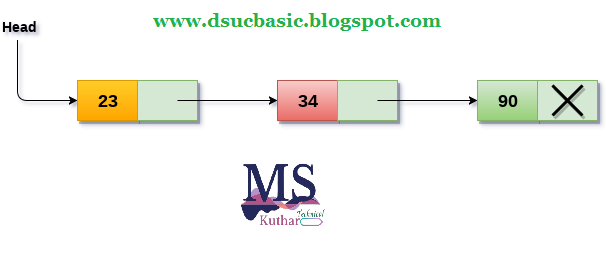
Consider the following scenario: the student's grades in three marks are maintained in a linked list, as indicated in the image.
Singly Linked List
Singly Linked List

  • The links are represented by the arrow in the diagram above. 
  • The marks earned by the student in each topic are stored in the data section of each node. 
  • The null pointer in the address part of the last node identifies it as the last node in the list. In the data section of the list, we can have as many elements as we like.

Operations on Singly Linked List

On a singly linked list, you can conduct a variety of actions. The following is a list of all such operations.
  1. Insertion in singly linked list at beginning.
  2. Insertion in singly linked list at end.
  3. Insertion in singly linked list after specific node.
    • Deletion and Traversing.
    1. Deletion at beginning.
    2. Deletion at the end of the list.
    3. Deletion after specified node.
    4. Traversing.
    5. Searching.

    Node Creation

    struct node   
    {  
        int data;   
        struct node *next;  
    };  
    struct node *head, *ptr;   
    ptr = (struct node *)malloc(sizeof(struct node *));  

    Insertion

    • Insertion into a singly linked list can take place at several points. The insertion is classified into the following types based on the position of the new node being inserted.

    Insertion in singly linked list at beginning

    • It's easy to add a new element to a single linked list at the start. Only a few changes to the node linkages are required. The steps below must be followed in order to add a new node to the list at the start.
    • Allocate space for the new node and place data in the node's data section. The following statements will accomplish this.
    ptr = (struct node *) malloc(sizeof(struct node *));  
                ptr → data = item   
    • Make the new node's link component point to the list's existing first node. The following expression will be used to do this.
    ptr->next = head;  
    • Finally, we must make the new node the first node in the list, which may be accomplished with the following statement.
    head= ptr ;

    Algorithm

    • Step 1: IF PTR = NULL
               Write OVERFLOW
               Go to Step 7
               [END OF IF]
    • Step 2: SET NEW_NODE = PTR
    • Step 3: SET PTR = PTR → NEXT
    • Step 4: SET NEW_NODE → DATA = VAL
    • Step 5: SET NEW_NODE → NEXT = HEAD
    • Step 6: SET HEAD = NEW_NODE
    • Step 7: EXIT
    Singly Linked List

    C program to insert new data (at the beginning) in singly linked list.
    #include<stdio.h>  
    #include<stdlib.h>  
    void beginsert(int);  
    struct node  
    {  
        int data;  
        struct node *next;  
    };  
    struct node *head;  
    void main ()  
    {  
        int choice,item;  
        do   
        {  
            printf("\nEnter the item which you want to insert?\n");  
            scanf("%d",&item);  
            beginsert(item);  
            printf("\nPress 0 to insert more ?\n");  
            scanf("%d",&choice);  
        }while(choice == 0);  
    }  
    void beginsert(int item)  
        {  
            struct node *ptr = (struct node *)malloc(sizeof(struct node *));  
            if(ptr == NULL)  
            {  
                printf("\nOVERFLOW\n");  
            }  
            else  
            {  
                ptr->data = item;  
                ptr->next = head;  
                head = ptr;  
                printf("\nNode inserted\n");  
            }    
        }  

    Expected Output:
    Enter the item which you want to insert?
    12
    Node inserted
    Press 0 to insert more ?
    0
    Enter the item which you want to insert?
    23
    Node inserted
    Press 0 to insert more ?
    2


    Implementation of Tree

    The tree data structure can be formed by using pointers to create the nodes dynamically. As shown below, the memory tree can be expressed as follows:


    • The memory representation of the tree data structure is shown in the diagram above. 
    • The node in the above structure has three fields. 
    • The data is stored in the second field, while the left child's address is stored in the first field and the right child's address is stored in the third field.

    A node's structure can be defined as follows in programming:

    struct node  

    {  

      int data;  

    struct node *left;  

    struct node *right;   

    }

    • Because binary trees can only have two children, and generic trees can have more than two, the above structure can only be defined for binary trees. 
    • In comparison to the binary tree, the structure of the node in generic trees would be different.

    Applications of trees
    • Trees are used to store data in a hierarchical form that is naturally hierarchical. Consider the file system. The file system, files, and folders are saved on the disc drive in the form of naturally hierarchical data in the form of trees.
    • Organize Data: It is used to arrange data in order to make insertion, deletion, and searching more efficient. A binary tree, for example, has a logN time for searching an element.
    • Trie: The dictionary is stored in a specific type of tree called a trie. It's a quick and easy approach to do dynamic spell checking.
    • Heap: Heap is a tree data structure that is also built using arrays. Priority queues are implemented using it.
    • B-Tree and B+Tree: B-Tree and B+Tree are tree data structures that are used in databases to implement indexing.
    • Routing table: In routers, the tree data structure is also used to store data in routing tables.
    Types of Tree data structure

    Generic tree: 
    • The generic tree is one of the different forms of tree data structures. A node in the general tree can have either 0 or maximum n nodes. 
    • The degree of the node is not limited in any way (the number of nodes that a node can contain). 
    • A root node is the node at the very top of a generic tree. Subtrees are the offspring of the parent node.

    • A generic tree can have an infinite number of subtrees. The subtrees in the general tree are unordered because the nodes in the subtrees cannot be ordered.
    • A downward edge runs through every non-empty tree, and these edges are connected to the nodes known as child nodes. 
    • Level 0 is assigned to the root node. Sibling nodes are those that have the same parent.
    Binary tree: 
    • The name binary implies two numbers, namely 0 and 1. Each node in a binary tree can have a maximum of two child nodes. 
    • The term "utmost" refers to whether a node has zero, one, or two nodes.

    Binary Search Tree: 
    • A binary search tree is a non-linear data structure in which one node is connected to a n number of other nodes. 
    • It's a data structure with nodes. In a binary search tree, a node can be represented by three fields: data portion, left-child, and right-child. 
    • In a binary search tree, a node can be connected to the utmost two child nodes, resulting in the node having two pointers (left child and right child pointer).
    • Every node in the left subtree must have a value less than the root node's value, and every node in the right subtree must have a value greater than the root node's value.

    C++ Programming Code for Selection Sort.

    C++ Programming Code for Selection Sort.

    Selection Sort
    /* C++ Program - Selection Sort */		
    #include<iostream.h>
    #include<conio.h>
    void main()
    {
    	clrscr();
    	int size, arr[50], i, j, temp;
    	cout<<"Enter Array Size : ";
    	cin>>size;
    	cout<<"Enter Array Elements : ";
    	for(i=0; i<size; i++)
    	{
    		cin>>arr[i];
    	}
    	cout<<"Sorting array using selection sort...\n";
    	for(i=0; i<size; i++)
    	{
    		for(j=i+1; j<size; j++)
    		{
    			if(arr[i]>arr[j])
    			{
    				temp=arr[i];
    				arr[i]=arr[j];
    				arr[j]=temp;
    			}
    		}
    	}
    	cout<<"Now the Array after sorting is :\n";
    	for(i=0; i<size; i++)
    	{
    		cout<<arr[i]<<" ";
    	}
    	getch();
    }


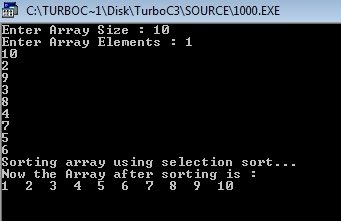
    Output:-


    Deletion Operation in Max Heap


    Deletion Operation in Max Heap
    In a max heap, deleting last node is very simple as it is not disturbing max heap properties.

    Deleting root node from a max heap is title difficult as it disturbing the max heap properties. We use the following steps to delete root node from a max heap...
    • Step 1: Swap the root node with last node in max heap
    • Step 2: Delete last node.
    • Step 3: Now, compare root value with its left child value.
    • Step 4: If root value is smaller than its left child, then compare left child with its right sibling. Else goto Step 6
    • Step 5: If left child value is larger than its right sibling, then swap root with left child. otherwise swap root with its right child.
    • Step 6: If root value is larger than its left child, then compare root value with its right child value.
    • Step 7: If root value is smaller than its right child, then swap root with rith child. otherwise stop the process.
    • Step 8: Repeat the same until root node is fixed at its exact position.
    Example
    Consider the above max heap. Delete root node (90) from the max heap.
    • Step 1: Swap the root node (90) with last node 75 in max heap After swapping max heap is as follows...
    • Step 2: Delete last node. Here node with value 90. After deleting node with value 90 from heap, max heap is as follows...
    • Step 3: Compare root node (75) with its left child (89).
    • Here, root value (75) is smaller than its left child value (89). So, compare left child (89) with its right sibling (70).
    • Step 4: Here, left child value (89) is larger than its right sibling (70), So, swap root (75) with left child (89).
    • Step 5: Now, again compare 75 with its left child (36).
    • Here, node with value 75 is larger than its left child. So, we compare node with value 75 is compared with its right child 85.

    • Step 6: Here, node with value 75 is smaller than its right child (85). So, we swap both of them. After swapping max heap is as follows...
    • Step 7: Now, compare node with value 75 with its left child (15).
    • Here, node with value 75 is larger than its left child (15) and it does not have right child. So we stop the process.

      Finally, max heap after deleting root node (90) is as follows...

    Insertion Operation in Max Heap

    Finding Maximum Value Operation in Max Heap

    It's easy to find the node in a max heap with the highest value. The root node in the max heap has the highest value of all the other nodes in the max heap. As a result, we can display the value of the root node as the maximum value in the max heap.

    Insertion Operation in Max Heap

    Insertion Operation in max heap is performed as follows...
    • Step 1: Insert the newNode as last leaf from left to right.
    • Step 2: Compare newNode value with its Parent node.
    • Step 3: If newNode value is greater than its parent, then swap both of them.
    • Step 4: Repeat step 2 and step 3 until newNode value is less than its parent nede (or) newNode reached to root.
    Example
    Consider the above max heap. Insert a new node with value 85.
    • Step 1: Insert the newNode with value 85 as last leaf from left to right. That means newNode is added as a right child of node with value 75. After adding max heap is as follows.
    • Step 2: Compare newNode value (85) with its Parent node value (75). That means 85 > 75
    • Step 3: Here newNode value (85) is greater than its parent value (75), then swap both of them. After swapping, the max heap is as follows...

    • Step 4: Now, again compare the newNode value (85) with its parent node value (89).
    • Here, the newNode value (85) is smaller than its parent node value (89). So, we stop the insertion process. Finally, the max heap after insertion of a new node with value 85 is as follows...

    Merge sorting in c

    C Program to Implement MERGE SORT

    Merge Sort


    #include<stdio.h>
    #include<stdlib.h>
    void Merge(int a[], int tmp[], int lpos, int rpos, int rend)
    {
        int i, lend, n, tmppos;
        lend = rpos - 1;
        tmppos = lpos;
        n = rend - lpos + 1;
        while(lpos <= lend && rpos <= rend)
        {
            if(a[lpos] <= a[rpos])
                tmp[tmppos++] = a[lpos++];
            else
                tmp[tmppos++] = a[rpos++];

        }

        while(lpos <= lend)
            tmp[tmppos++] = a[lpos++];
        while(rpos <= rend)
            tmp[tmppos++] = a[rpos++];
        for(i = 0; i < n; i++, rend--)
            a[rend] = tmp[rend];
    }
    void MSort(int a[], int tmp[], int left, int right)
    {
        int center;
        if(left < right)
        {
            center = (left + right) / 2;
            MSort(a, tmp, left, center);
            MSort(a, tmp, center + 1, right);
            Merge(a, tmp, left, center + 1, right);
        }
    }
    void MergeSort(int a[], int n)
    {
        int *tmparray;
        tmparray = malloc(sizeof(int) * n);
        MSort(a, tmparray, 0, n-1);
        free(tmparray);
    }
    main()
    {
        int i, n, a[10];
        printf("Enter the number of elements :: ");
        scanf("%d",&n);
        printf("Enter the elements :: ");
        for(i = 0; i < n; i++)
        {
            scanf("%d",&a[i]);
        }
        MergeSort(a,n);
        printf("The sorted elements are ::  ");
        for(i = 0; i < n; i++)
            printf("%d  ",a[i]);
        printf("\n");
    }

    OUTPUT:

    Enter the number of elements :: 7
    Enter the elements :: 70 60 50 40 10 20 30
    The sorted elements are ::  10  20  30  40  50  60  70